
Part 1: Enable Developer Options
First of all you need to enable developer options on your firestick:
- Select FireStick Settings.
- Click My Fire TV.
- Click About (only if you DO NOT see Developer Options on this screen).
- Click on your Fire TV Stick quickly 7 times.
- You will see a notification saying No need, you are already a developer.
- Press the back button once or go back to Settings > My Fire TV and you will now see Developer Options.
Part 2: Install IPTV Smarters Pro
Since the Amazon Store does not host IPTV Smarters Pro, we need to sideload it using the Downloader app:
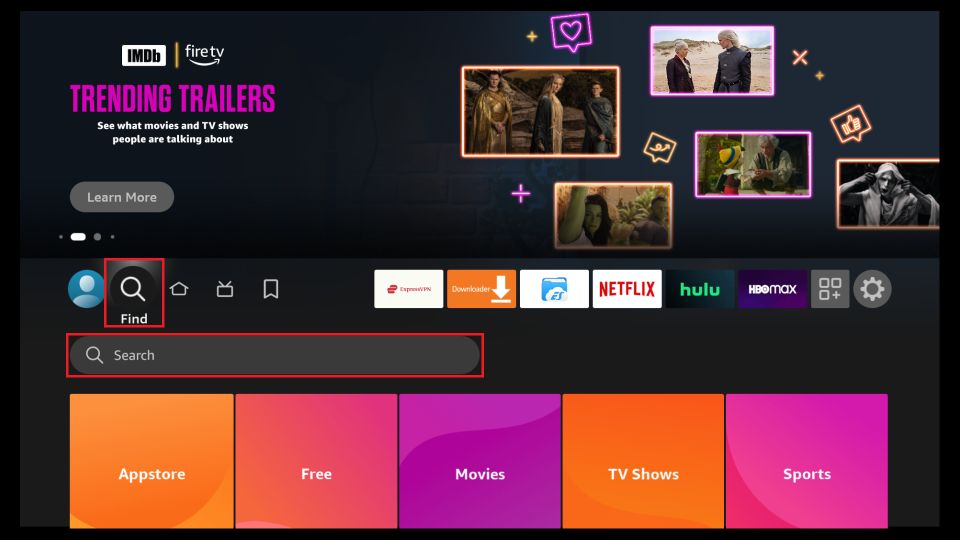
- Click the Magnifying Glass > Search option on the home screen. Search for “Downloader” and install it.

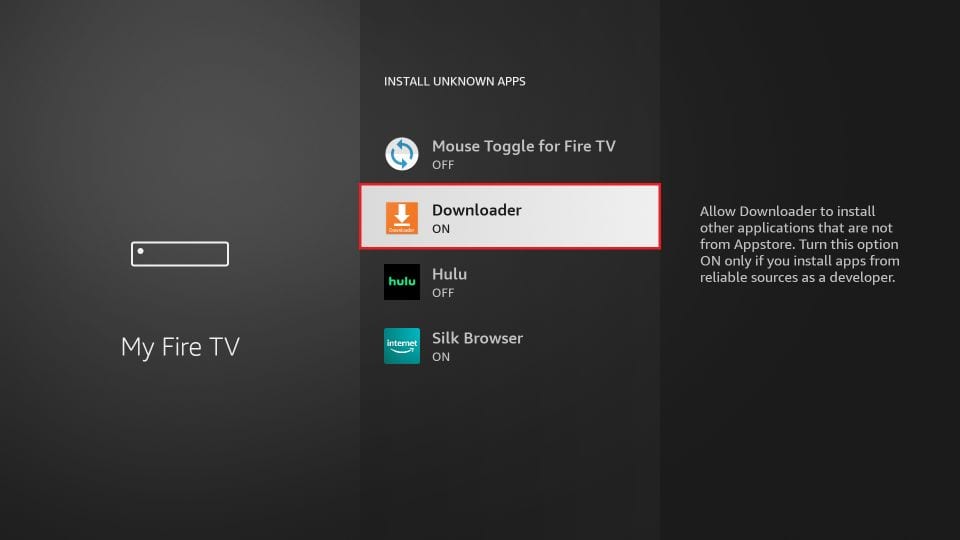
- Enable permissions for unknown apps by going to Settings > My Fire TV > Developer options > Install from unknown apps and enable Downloader.
Sideload IPTV Smarters Pro APK
- Open the Downloader app
- Enter the path: firesticktricks.com/smarter and click GO
- Wait for the download to complete and click Install
- After installation, click DONE and delete the APK file to save space
How to Use IPTV Smarters on FireStick
To create a shortcut, press the Menu button (3-line button) on the remote and click Move to place the app on your top shelf.
When you first open the app:
- Accept the Terms of Use
- Click ADD NEW USER
- Select Login with Xtream Codes API
- Enter the details sent via Email
If you haven’t subscribed yet, you can do so here: Click Here